Add issues to projects on GitHub
Adding issues to projects on GitHub is a great way to keep track of what needs to be done. This action will add issues to a project board on GitHub when they are opened or labeled. But adding issues to a project board is a manual process. The action actions/add-to-project automates the process of adding issues to a project board.
Setting up GitHub
In the workflows the environment variable ADD_TO_PROJECT_URL is used to define the project board. The project board is defined by the URL of the project board. The URL can be found in the browser when the project board is opened. The URL is defined in the env section of the workflow file.
The workflow also requires a personal access token (PAT) to authenticate with GitHub. The PAT is defined in the secrets section for Actions of the repository. The PAT is defined in the github-token input of the action.
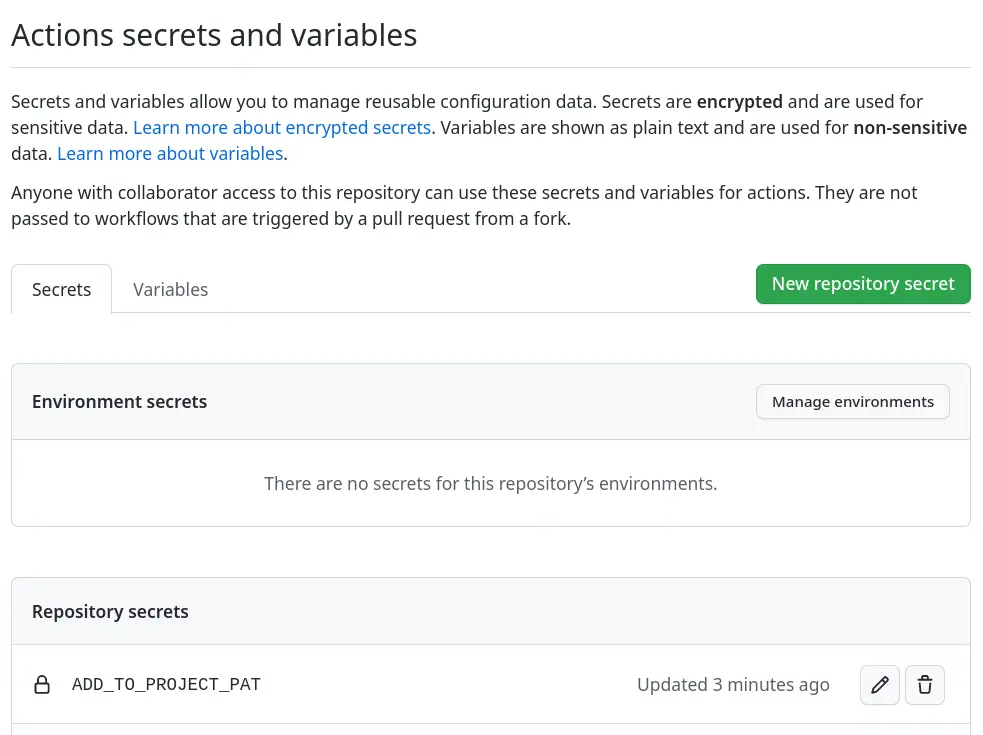
If the repository also depends on DependaBot, then the workflow also requires a PAT to authenticate with GitHub. The PAT is defined in the secrets section for DependaBot of the repository. The PAT is defined in the github-token input of the action.
Adding issues
The following workflow is triggered when an issues is opened and will add issues to a project board when they’re opened and it will use the labels on the issue to determine if it should be added to the project board. The labels are defined in the labeled input and the operator is defined in the label-operator input. The operator can be one of the following: OR, AND, or NOT.
.github/workflows/add-to-project.yml for GitHub Actions¶ 1---
2name: Add to project board
3
4on:
5 issues:
6 types:
7 - opened
8
9env:
10 ADD_TO_PROJECT_URL: https://github.com/users/acme/projects/1
11
12jobs:
13 add-to-project:
14 name: Add issue to project
15 runs-on: ubuntu-latest
16 steps:
17 - uses: actions/add-to-project@v0.4.0
18 with:
19 project-url: ${{ env.ADD_TO_PROJECT_URL }}
20 github-token: ${{ secrets.ADD_TO_PROJECT_PAT }}
21 labeled: bugs, enhancement, policy, project, security, stale
22 label-operator: OR
Adding pull-requests
The workflow can also be triggered when a pull-request is labeled. This is different from the previous workflow as that workflow only was triggered when an issue was opened. The rest of the workflow is the same as the previous workflow, but the labeled section is different.
.github/workflows/add-to-project.yml for GitHub Actions¶ 1---
2name: Add to project board
3
4on:
5 pull_request:
6 types:
7 - labeled
8
9env:
10 ADD_TO_PROJECT_URL: https://github.com/users/acme/projects/1
11
12jobs:
13 add-to-project:
14 name: Add issue to project
15 runs-on: ubuntu-latest
16 steps:
17 - uses: actions/add-to-project@v0.4.0
18 with:
19 project-url: ${{ env.ADD_TO_PROJECT_URL }}
20 github-token: ${{ secrets.ADD_TO_PROJECT_PAT }}
21 labeled: dependencies, stale
22 label-operator: OR
Until now the label-operator was OR, but now it’s AND in the next examepl. This means that the issue will only be added to the project board if it has both the github and policy labels.
.github/workflows/add-to-project.yml for GitHub Actions¶ 1---
2name: Add to project board
3
4on:
5 pull_request:
6 types:
7 - labeled
8
9env:
10 ADD_TO_PROJECT_URL: https://github.com/users/acme/projects/1
11
12jobs:
13 add-to-project:
14 name: Add issue to project
15 runs-on: ubuntu-latest
16 steps:
17 - uses: actions/add-to-project@v0.4.0
18 with:
19 project-url: ${{ env.ADD_TO_PROJECT_URL }}
20 github-token: ${{ secrets.ADD_TO_PROJECT_PAT }}
21 labeled: github, policy
22 label-operator: AND
Combining issues and pull-requests
In the previous example the workflow was triggered when an issue was opened and when a pull-request was labeled. But the workflow can also be triggered when an issue is labeled and when a pull-request is opened. Secondly it can have multiple steps to select the labels and the operator to add issues and pull-request to the project board.
Note
Currently this action supports the following issues events:
opened
transferred
labeled
and the following pull_request events:
opened
labeled
Combining issues and pull-requests to a single workflow with multiple steps to add issues and pull-requests to a project board is shown in the following example. It will add issues to a project board when they are opened and labeled. It will also add pull-requests to a project board when they are labeled. This allows for more flexibility in the workflow and selecting the labels and the operator to add issues and pull-requests to the project board.
.github/workflows/add-to-project.yml for GitHub Actions¶ 1---
2name: Add to project board
3
4on:
5 issues:
6 types:
7 - opened
8 - labeled
9 pull_request:
10 types:
11 - labeled
12
13env:
14 ADD_TO_PROJECT_URL: https://github.com/users/acme/projects/1
15
16jobs:
17 add-to-project:
18 name: Add issue to project
19 runs-on: ubuntu-latest
20 steps:
21 - uses: actions/add-to-project@v0.4.0
22 with:
23 project-url: ${{ env.ADD_TO_PROJECT_URL }}
24 github-token: ${{ secrets.ADD_TO_PROJECT_PAT }}
25 labeled: bugs, enhancement, policy, project, security, stale
26 label-operator: OR
27
28 - uses: actions/add-to-project@v0.4.0
29 with:
30 project-url: ${{ env.ADD_TO_PROJECT_URL }}
31 github-token: ${{ secrets.ADD_TO_PROJECT_PAT }}
32 labeled: dependencies, stale
33 label-operator: OR
34
35 - uses: actions/add-to-project@v0.4.0
36 with:
37 project-url: ${{ env.ADD_TO_PROJECT_URL }}
38 github-token: ${{ secrets.ADD_TO_PROJECT_PAT }}
39 labeled: github, policy
40 label-operator: AND
Note
This workflow is based on the actions/add-to-project action, but GitHub has since added the ability to add issues to a project board automatically and is in beta for now together with automatically archiving project items.